# Guide to cPanel API 2
Warning:
The cPanel API 2 system is deprecated. We **strongly** recommend that you use [UAPI](/cpanel/introduction/) instead of cPanel API 2.
## Overview
cPanel API 2 accesses cPanel account information and modifies settings.
Important:
When you enable a non-*Standard Node* server profile, the system **disables** API calls associated with that profile's disabled roles.
Notes:
* If the desired function is available, we recommend that you use our newer [UAPI](/cpanel/introduction/) functions.
* You **cannot** call this API's functions via another API's call methods. For more information, read the [API method distinctions](#API-method-distinctions) section below.
## Basic usage
**WHM API**
```
https://hostname.example.com:2087/cpsess##########/json-api/cpanel?cpanel_jsonapi_user=user&cpanel_jsonapi_apiversion=2&cpanel_jsonapi_module=Module&cpanel_jsonapi_func=function¶meter="value"
```
**Template Toolkit**
Note:
Currently, individual function documentation does not include Template Toolkit examples.
```
[%-
USE Api2;
SET myvariable = execute(
'Module', 'function',
{
'parameter' => 'value',
'parameter' => 'value',
'parameter' => 'value',
}
);
%]
```
Note:
For more information, read our [Guide to Template Toolkit](/guides/guide-to-template-toolkit/) documentation.
**LiveAPI PHP Class**
```
$cpanel = new CPANEL(); // Connect to cPanel - only do this once.
// Call the function.
$my_variable = $cpanel->api2(
'Module', 'function',
array(
'parameter' => 'value',
'parameter' => 'value',
'parameter' => 'value',
)
);
```
Note:
For more information, read our [Guide to LiveAPI System](/guides/guide-to-the-liveapi-system/) documentation.
**LiveAPI Perl Module**
```
my $cpliveapi = Cpanel::LiveAPI->new(); # Connect to cPanel - only do this once.
# Call the function.
my $my_variable = $cpliveapi->api2(
'Module', 'function',
{
'parameter' => 'value',
'parameter' => 'value',
'parameter' => 'value',
}
);
```
Note:
For more information, read our [Guide to LiveAPI System](/guides/guide-to-the-liveapi-system/) documentation.
**cPanel Tag System (deprecated)**
Warning:
* cPanel tags are **deprecated**. We **strongly** recommend that you only use the LiveAPI system to call the cPanel APIs. Examples are only present in order to help developers move from the old cPanel tag system to our LiveAPI.
* cPanel API 2 calls that use cPanel tags vary in code syntax and in their output.
* For more information, read our [Deprecated cPanel Tag Usage](/cpanel-api-2/cpanel-api-2-deprecate-cpanel-tag-usage) documentation.
```
```
For more information, read our [Use WHM API to Call cPanel API and UAPI](/whm/use-whm-api-to-call-cpanel-api-and-uapi) documentation.
Warning:
Unless you call this API via the WHM API, you **cannot** call this API via WHM's ports (`2086` or `2087`).
This example uses the following variables:
| Variable | Description | Example |
| --- | --- | --- |
| `Module` | The function's module. | `Email` |
| `function` | The cPanel API 2 function. | `addpop` |
| `parameter` | An input parameter's name. cPanel API 2 functions use named arguments. | `domain` |
| `value` | The input parameter's value. The term "Boolean" in our documentation refers to parameters that accept values of `1` or `0`. cPanel & WHM's APIs do **not** support the literal values of `true` and `false`. | `example.com` |
| `template` | For cPanel tag function calls only, markup language that defines how the function's output displays. For more information, read our [Deprecated cPanel Tag Usage](/cpanel-api-2/cpanel-api-2-deprecate-cpanel-tag-usage/) documentation. | `%[br /` |
| ` returns` | For cPanel tag function calls only, a comma-separated list of return parameters, to limit the function's output.
For more information, read our [Deprecated cPanel Tag Usage](/cpanel-api-2/cpanel-api-2-deprecate-cpanel-tag-usage/) documentation. | `reason,result` |
Warning:
Do **not** attempt to use cPanel or WHM interface URLs to perform actions in custom code. You **must** call the appropriate API functions in order to perform the actions of cPanel & WHM's interfaces. For example, do **not** pass values to `.html` pages, as in the following example: `http://example.com:2082/frontend/x3/mail/doaddpop.html/email=name&domain=user.com` While this **unsupported** method sometimes worked in previous versions of cPanel & WHM, we **strongly** discourage its use and do **not** guarantee that it will work in the future. Instead, the correct method to perform this action is to call the appropriate API function.
**Command Line**
```
cpapi2 --user=username --output=type Module function parameter=value parameter=value
```
cPanel API2 calls through the command line consist of the following basic parts:
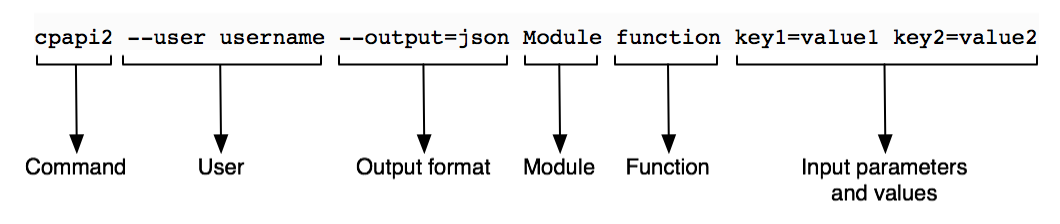
| Part | Description |
| --- | --- |
| *Command* | This value is always `cpapi2` for calls to cPanel API 2. If you run CloudLinux™, you must use the full path of the cpapi2 command: `/usr/local/cpanel/bin/cpapi2`. |
| *Output Type* | The API output type that you wish to receive. Use `--output=json` to return JSON-formatted output.Use `--output=jsonpretty` to return indented JSON-formatted output.Use `--output=yaml` to return YAML-formatted output.This parameter defaults to `--output=yaml`. |
| *Module* | The cPanel API 2 module name. |
| *Function* | The cPanel API 2 function. |
| *User* | The cPanel account-level username. |
| *Input parameters and values* | The function's input parameters and their values. You **must** URI-encode values.Separate multiple `parameter=value` pairs with a space character.Special characters within a key's value may cause an error. You **must** either escape any special characters within values or surround the value with appropriate quotes. For more information, read Wikipedia's Escape Characters article. For example, a bash shell command with a JSON-encoded value may appear similar to one of the following:`cpapi2 --user username Module function key=[\"sslinstall\",\"videotut\"]"``cpapi2 --user username Module function key='{"videotut","sslinstall"}'`The term "Boolean" in our documentation refers to parameters that accept values of `1` or `0`. cPanel & WHM's APIs do **not** support the literal values of `true` and `false.` |
Note:
For more information about this feature, run the following command: `cpapi2 --help`
### Example variables
This example uses the following variables:
| Variable | Description | Example |
| --- | --- | --- |
| `Module` | The function's module. | `Email` |
| `function` | The cPanel API 2 function. | `addpop` |
| `parameter` | An input parameter's name. cPanel API 2 functions use [named arguments](https://en.wikipedia.org/wiki/Named_parameter). | `domain` |
| `value` | The input parameter's value. The term "Boolean" in our documentation refers to parameters that accept values of `1` or `0`. cPanel & WHM's APIs do **not** support the literal values of `true` and `false`. | `example.com` |
| `template` | For cPanel tag function calls only, markup language that defines how the function's output displays. For more information, read our [Deprecated cPanel Tag Usage](/cpanel-api-2/cpanel-api-2-deprecate-cpanel-tag-usage) documentation. | `%[br /]` |
| `returns` | For cPanel tag function calls only, a comma-separated list of return parameters, to limit the function's output. For more information, read our [Deprecated cPanel Tag Usage](/cpanel-api-2/cpanel-api-2-deprecate-cpanel-tag-usage) documentation. | `reason,result` |
Warning:
Do **not** attempt to use cPanel or WHM interface URLs to perform actions in custom code. You **must** call the appropriate API functions in order to perform the actions of cPanel & WHM's interfaces. For example, do not pass values to `.html` pages, as in the following example: `http://example.com:2082/frontend/x3/mail/doaddpop.html/email=name&domain=user.com` While this **unsupported** method sometimes worked in previous versions of cPanel & WHM, we **strongly** discourage its use and do **not** guarantee that it will work in the future. Instead, the correct method to perform this action is to call the appropriate API function.
## Custom Event Handlers and Standardized Hooks
You can use the [Standardized Hook System](/guides/guide-to-standardized-hooks/) to customize the events before and after a cPanel API call.
## API method distinctions
WebPros International, LLC produces four current and two deprecated APIs, and they all include separate sets of functions. Make **certain** that the function and module that you call exist in the API version that your code uses.
Important:
API calls **must** use the correct port:
* `2082` — Unsecure calls to cPanel's APIs.
* `2083` — Secure calls to cPanel's APIs.
* `2095` — Unsecure calls to cPanel's APIs via a Webmail session.
* `2096` — Secure calls to cPanel's APIs via a Webmail session.
* `2086` — Unsecure calls to WHM's APIs, or to cPanel's APIs via the WHM API.
* `2087` — Secure calls to WHM's APIs, or to cPanel's APIs via the WHM API.
Otherwise-correct calls will return `Permission denied` or `Function not found errors` if they use an incorrect port number.
For more information, read our [Guide to Testing Custom Code - cPanel API](/guides/guide-to-testing-custom-code/guide-to-testing-custom-code-cpanel-api-and-uapi-calls/) documentation.
### Examples of calls to the desired API
#### WHM API 1 examples
**Call through the WHM API**
```
https://hostname.example.com:2087/cpsess##########/json-api/cpanel?cpanel_jsonapi_user=user&cpanel_jsonapi_apiversion=2&cpanel_jsonapi_module=Module&cpanel_jsonapi_func=function¶meter="value"
```
Note:
Browser-based calls to WHM API 1 **must** include the WHM API version (`api.version=1`). If you omit the version, the system calls WHM API 0, which may not contain the desired function, or may contain an older version of that function.
**Command-line call**
```
cpapi2 --user=username --output=type Module function parameter=value parameter=value
```
Note:
For more information, read our [Guide to Testing Custom Code - WHM API Calls](/guides/guide-to-testing-custom-code/guide-to-testing-custom-code-whm-api-calls/) and [Guide to WHM API 1](/whm/introduction/) documentation.
#### UAPI examples
**cPanel or Webmail session URL call**
```
https://hostname.example.com:2083/cpsess##########/execute/Module/function?parameter=value¶meter=value¶meter=value
```
**Command-line call**
```
uapi --user=username --output=type Module function parameter=value parameter=value
```
**LiveAPI PHP Class call**
```
$cpanel = new CPANEL(); // Connect to cPanel - only do this once.
// Call a UAPI function.
$function_result = $cpanel->uapi(
'Module', 'function',
array(
'parameter' => 'value',
'parameter' => 'value',
'parameter' => 'value',
)
);
```
Note:
For more information, read our [Guide to Testing Custom Code - cPanel API and UAPI Calls](/guides/guide-to-testing-custom-code/guide-to-testing-custom-code-cpanel-api-and-uapi-calls/) and [Guide to UAPI](/cpanel/introduction/) documentation.
**Template Toolkit call**
```
[%
execute(
'Module', 'function',
{
'parameter' => 'value',
'parameter' => 'value',
'parameter' => 'value',
}
);
%]
```
#### cPanel API 2 Examples
**Call through the WHM API**
```
https://hostname.example.com:2087/cpsess##########/json-api/cpanel?cpanel_jsonapi_user=user&cpanel_jsonapi_apiversion=2&cpanel_jsonapi_module=Module&cpanel_jsonapi_func=function¶meter="value"
```
**Command-line call**
```
cpapi2 --user=username --output=type Module function parameter=value parameter=value
```
**Template Toolkit call**
```
[%-
USE Api2;
SET myvariable = execute(
'Module', 'function',
{
'parameter' => 'value',
'parameter' => 'value',
'parameter' => 'value',
}
);
%]
```
**LiveAPI PHP Class call**
```
$cpanel = new CPANEL(); // Connect to cPanel - only do this once.
// Call the function.
$my_variable = $cpanel->api2(
'Module', 'function',
array(
'parameter' => 'value',
'parameter' => 'value',
'parameter' => 'value',
)
);
```
**LiveAPI Perl Module**
```
my $cpliveapi = Cpanel::LiveAPI->new(); # Connect to cPanel - only do this once.
# Call the function.
my $my_variable = $cpliveapi->api2(
'Module', 'function',
{
'parameter' => 'value',
'parameter' => 'value',
'parameter' => 'value',
}
);
```
Note:
For more information, read our [Guide to Testing Custom Code - cPanel API and UAPI Calls](/guides/guide-to-testing-custom-code/guide-to-testing-custom-code-cpanel-api-and-uapi-calls/) and [Guide to UAPI](/cpanel/introduction/) documentation.
#### WHM API 0 (deprecated)
Warning:
WHM API 0 is **deprecated**. We **strongly** recommend that you **only** use the equivalent [WHM API 1](/whm/introduction/) functions instead.
**Call through the WHM API**
```
https://hostname.example.com:2087/cpsess##########/json-api/accountsummary?user=username
```
**Command-line call**
```
whmapi0 accountsummary user=username
```
Note:
For more information, read our [Guide to Testing Custom Code - WHM API Calls](/guides/guide-to-testing-custom-code/guide-to-testing-custom-code-whm-api-calls/) and [Guide to WHM API 1](/whm/introduction/) documentation.
#### cPanel API 1 (deprecated)
Warning:
cPanel API 1 is deprecated. We strongly recommend that you use [UAPI](/cpanel/introduction/) instead.
**Command-line call**
```
cpapi1 --user=username --output=type Module function parameter=value parameter=value
```
**LiveAPI PHP Class call**
```
$cpanel = new CPANEL(); // Connect to cPanel - only do this once.
$your_variable = $cpanel->api1('Module', 'function', array('parameter', 'parameter', 'parameter') ); // Call the function.
```
**LiveAPI Perl Module**
```
my $cpliveapi = Cpanel::LiveAPI->new(); # Connect to cPanel - only do this once.
my $your_variable = $cpliveapi->api1('Module', 'function', ['parameter', 'parameter', 'parameter'] ); # Call the function.
```
**Template Toolkit call**
```
[%-
USE Api2;
SET myvariable = execute(
'Module', 'function',
{
'parameter' => 'value',
'parameter' => 'value',
'parameter' => 'value',
}
);
%]
```
Note:
For more information, read our [Guide to Testing Custom Code - cPanel API and UAPI Calls](/guides/guide-to-testing-custom-code/guide-to-testing-custom-code-cpanel-api-and-uapi-calls/) and [Guide to UAPI](/cpanel/introduction/) documentation.