[Development Guides Home](/guides) >> [Guide to Package Extensions](/guides/guide-to-package-extensions)
# Guide to Package Extensions - Template Files
## Introduction
Package extensions use Template Toolkit (.tt2) files to display variable forms in the WHM interface. The system [injects](https://en.wikipedia.org/wiki/Code_injection) the template file into the *Package Extensions* section of WHM's [*Add a Package*](https://docs.cpanel.net/whm/packages/add-a-package/), [*Edit a Package*](https://docs.cpanel.net/whm/packages/edit-a-package/), [*Create a New Account*](https://docs.cpanel.net/whm/account-functions/create-a-new-account/), and [*Modify an Account*](https://docs.cpanel.net/whm/account-functions/modify-an-account/) interfaces.
* The template file's name **must** match the default settings file's filename **exactly**, but include the `.tt2` file extension. For example, for the `dog` default settings file, create the `dog.tt2` template file.
* You **must** store the template file in the `/var/cpanel/packages/extensions` directory.
* The system injects template code into a `fieldset` tag when it displays in the WHM interface. For this reason, the template file must **only** return HTML that is valid in a `fieldset` tag.
div
Important:
To prevent the entry of arbitrary or malicious code, the template's form **must** [filter HTML](http://www.template-toolkit.org/docs/manual/Filters.html#section_html).
## The template file
div
Note:
This document assumes that you understand basic HTML and Template Toolkit. For more information, read our [Guide to Template Toolkit](/guides/guide-to-template-toolkit/) documentation.
The following example is a template file for the `dog` extension:
```
[% locale.maketext('Dog Species') %]
[% locale.maketext('Tail Length') %]
[% locale.maketext('Spots') %]
```
### Textboxes
```
[% locale.maketext('Dog Species') %]
```
* Lines 1 through 6 create a text box with the localized *Dog Species* label.
* Lines 1, 2, and 3 use [class selectors](#classselectors) to mimic the style of the WHM interface.
* Line 4 uses [the data.defaults structure](#templatevariableuse) to access the default settings file to retrieve the default value for the extension's `dog_species` setting.
* Line 4 also filters HTML from the input. The pipe character (`|`) represents the FILTER directive.
### Radio buttons
```
[% locale.maketext('Tail Length') %]
```
* Lines 8 through 18 create three radio buttons under the localized *Tail Length* label. Radio buttons will **only** submit data if the user selects them.
* If the user has not selected a specific radio button, the system will **not** store data for that choice.
* For example, if the user **does not** select the `tiny` and `long` radio buttons, but **does** select the `normal` button, the system will only save the `dog_tail_length=normal` setting to the account or package file.
* Lines 8, 9, and 10 use [class selectors](#classselectors) to mimic the style of the WHM interface.
* Lines 11, 13, and 15 use [the data.defaults structure](#templatevariableuse) to access the default settings file to retrieve default values.
### Checkboxes
```
```
* Lines 20 through 25 create a checkbox under the localized *Spots* label. The system saves checkbox values as `0` if the checkbox is deselected when the user saves the form.
* The system interprets any other value as `true` and will select the checkbox when it displays the form.
* When a user saves a form that contains the template, the system saves unselected checkboxes as `0` and selected checkboxes as `1`.
Important:
Do **not** use the values `no`, `false`, or a blank value to indicate a false value in the template or default settings files.
Lines 20, 21, and 22 use [class selectors](#classselectors) to mimic the style of the WHM interface.
Line 23 uses [the data.defaults structure](#templatevariableuse) to access the default settings file to retrieve default values.
### [Template variable use](#templatevariableuse)
Important:
**All** of the variables that you use in the template file **must** exist in the default settings file.
The `data.defaults` structure passes package extension data to your template. To include a package extensions variable in your template, add `data.defaults.` to the beginning of the variable name that you used in the default settings file.
For example, to create a text input element that allows users to set the value of the `dog_species` variable, use the following code:
```
```
### Class selectors
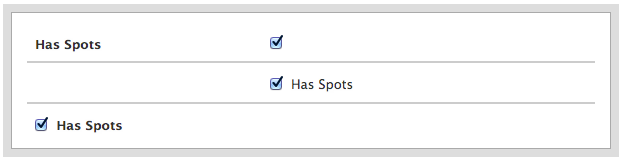
The `propertyEditor`, `propertyLabel`, `propertyValue`, and `propertyCombined` class selectors provide default behaviors that match the style of the WHM interface.
Important:
Do **not** use the `propertyCombined` class selector with the `propertyLabel` or `propertyValue` class selectors in the same template.
#### One Column
Use the `propertyCombined` class selector to create a template with a single column.

This example uses the following code:
```
[% locale.maketext('Has Spots') %]
```
#### Two Columns
Use the `propertyEditor`, `propertyLabel`, and `propertyValue` class selectors to display form elements in two columns:
```