WHM API 1 accesses the WHM interface's features. You can use this API to perform server administration tasks, administrate cPanel and WHM reseller accounts, and manage cPanel & WHM services.
Note
- When you enable a non-Standard Node server profile, the system disables API calls associated with that profile's disabled roles.
- Use the
applistcommand to return an alphabetical list of WHM API 1 functions.- You cannot call this API's functions via another API's call methods.
https://hostname.example.com:2087/cpsess##########/json-api/accountsummary?api.version=1&user=usernameWHM API 1 calls through JSON consist of the following basic parts:

The web server's HTTP address and the port number to use. Generally, this value begins with https:// and the domain name.
When you call this API, use the following ports:
2086- Unsecure calls as a specific WHM account.2087- Secure calls as a specific WHM account.
Warning
You cannot call this API via cPanel ports (
2082or2083) or Webmail ports (2095or2096).
The current session's security token.
Note
Cookie-based calls (for example, calls from a web browser) require a security token. For other authentication methods, read our Guide to API Authentication documentation.
The API output type that you wish to receive. Use json-api to return JSON-formatted output.
The WHM API function.
The API version to use. To call WHM API 1, set the api.version parameter to 1.
Important
You must include the API version in your call.
The function's input parameters and their values.
- You must URI-encode these values.
- Separate multiple
parameter=valuepairs with the ampersand character (&).
Note
The term "Boolean" in our documentation refers to parameters that accept values of
1or0. cPanel & WHM's APIs do not support the literal values oftrueandfalse.
whmapi1 accountsummary user=username- WHM API 1 calls via the command line do not return the metadata that other methods return if they experience errors that prevent a successful function run. For more information, read our WHM API 1 - Return Data documentation.
WHM API 1 calls through the command line consist of the following basic parts:
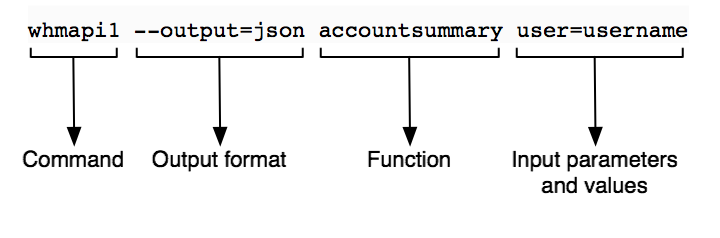
This value is always whmapi1 for calls to WHM API 1.
Note
If you run CloudLinux™, you must use the full path of the
whmapi1command:
/usr/local/cpanel/bin/whmapi1The API output type that you wish to receive.
- Use
--output=jsonto return JSON-formatted output. - Use
--output=jsonprettyto return indented JSON-formatted output. - Use
--output=yamlto return YAML-formatted output.
Note
This parameter defaults to
--output=yaml.
The WHM API 1 function.
The function's input parameters and their values.
- Separate multiple parameter=value pairs with a space character.
- Special characters within a key's value may cause an error. You must either escape any special characters within values or surround the value with appropriate quotes. For more information, read Wikipedia's Escape Characters article. For example, a bash shell command with a JSON-encoded value may appear similar to one of the following:
whmapi1 function key=[\"sslinstall\",\"videotut\"]"whmapi1 function key='{"videotut","sslinstall"}'
Note
The term "Boolean" in our documentation refers to parameters that accept values of
1or0. cPanel & WHM's APIs do not support the literal values oftrueandfalse.
For more information about this feature, run the following command:
whmapi1 --helpDo not attempt to use cPanel or WHM interface URLs to perform actions in custom code. You must call the appropriate API functions in order to perform the actions of cPanel & WHM's interfaces.
For example, do not pass values to .html pages, as in the following example:
https://example.com:2083/cpsess###########/frontend/jupiter/email_accounts/index.html/create#email=test&domain=example.com```

While this **unsupported** method sometimes worked in previous versions of cPanel & WHM, we **strongly** discourage its use and do **not** guarantee that it will work in the future. Instead, the correct method to perform this action is to call the appropriate API function.