You can call cPanel API and UAPI functions through the WHM API 1.
Important:
We recommend that you use WHM API 1 uapi_cpanel function. This function is a more flexible way to call cPanel API functions from WHM. For example, you can use the uapi_cpanel function with the WHM API 1 batch function.
This method is useful, for example, when you develop plugins for WHM users, particularly resellers, but need to access cPanel functions. You can make these calls from within either the WHM or cPanel interfaces.
For more information about WHM API 1 calls, read our Guide to WHM API 1 documentation.
WHM API 1 calls consist of the following basic parts:
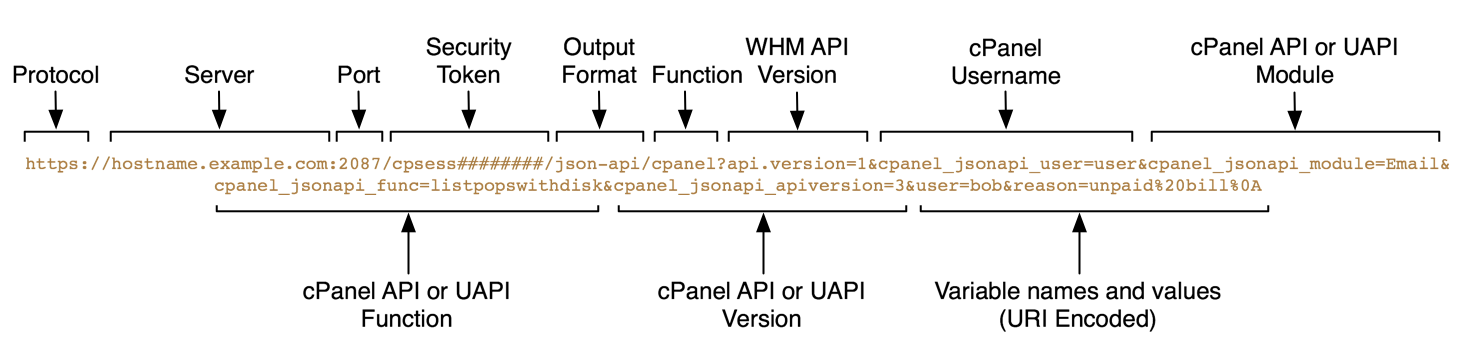
The web server's HTTP address.
Generally, this value is https:// and the hostname.
Example:
https://hostname.example.comThe port number to access.
2087- Secure connection.2086- Insecure connection.
Note:
- We strongly recommend that you use port
2087and a secure connection. - If you use port
2086and enable the Always redirect to SSL option in WHM's Tweak Settings interface (WHM >> Home >> Server Configuration >> Tweak Settings), the system redirects insecure API calls and causes errors.
Example:
2087The current session's security token.
Example:
cpsess123456789The output type to return JavaScript Object Notation (JSON). We only support the JSON output format.
Example:
json_apiThe WHM API 1 function to call. For cPanel API 2 and UAPI, use the cpanel function.
Example:
cpanelThe cPanel username for the account through which to call the function.
Make certain that you specify the username in lowercase characters only. cPanel & WHM automatically converts usernames to lowercase when you create a cPanel account. For this reason, if you supply a username that includes some or all capital letters, the call will fail.
Example:
cpanel_jsonapi_user=userThe UAPI module name.
Important:
Module names are case-sensitive.
Example:
cpanel_jsonapi_module=EmailThe UAPI function name.
Important:
Function names are case-sensitive.
Example:
cpanel_jsonapi_func=listpopswithdisk1The cPanel API version to use.
2- Use cPanel API 2.3- Use UAPI.
Warning:
If you do not supply this parameter, the system defaults to cPanel API 2.
Example:
cpanel_jsonapi_apiversion=3The function's input parameters and their values.
Note:
- Separate multiple
parameter=valuepairs with the ampersand character (&). - You must URI-encode these values.
Example:
domain=example.com